Software Deployment
This page covers installation and upgrade of the NE503 platform software release package (.tar.gz). The system OS uses a .swu package.
1. Prepare the Release Package
Download neoruntime-hailo15-<version>.tar.gz from neoruntime Releases.
Before starting, confirm that:
- The target is an NE503 device and the Web console or SSH is available.
- Web upgrade uses an administrator account; SSH deployment requires
rootprivileges. - The release package embeds an OS compatibility range (for example, v1.1.0 requires OS 1.12.0). Verify
System OS VersionunderSettings → Device Info. /datais writable and has enough space:df -h /data. Package extraction, deployment staging, and rollback backups all consume space. Since v1.1.0, deployment uses hard links for immutable release files to reduce peak usage, but historical upgrade files are not cleaned automatically.- Record the current
Firmware Version. Keep power and network connectivity stable during the upgrade.
2. Upgrade Through the Web Console
Use this method when the device is running and reachable through the Web console.
-
Open
https://<device-ip>and sign in with an administrator account. -
Open
Settings → Device Info. -
Under
Firmware & Hardware, findFirmware Versionand click itsUpdatebutton. Do not clickUpdatebesideSystem OS Version.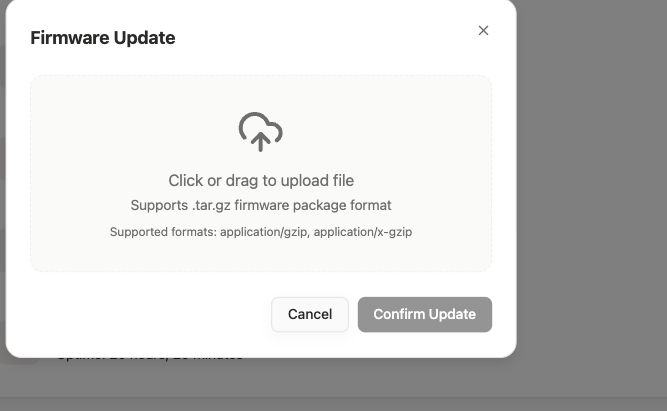
-
Upload one
neoruntime-hailo15-<version>.tar.gzfile. -
Confirm that power is stable, select
I understand and wish to continue with the upgrade, and clickConfirm Update. -
Wait for upload, writing, and reboot to finish. Do not refresh the page, click again, or cut power.
-
After the device comes back online, sign in again and verify
Firmware Version.
Success: the device is online again, you can sign in, and Firmware Version shows the target version. If Device offline appears, check power and network, then click Re-detect.
3. Install or Upgrade Through SSH
Use deploy.sh when the Web entry is unavailable or command-line deployment is required:
scp build/release/neoruntime-hailo15-<version>.tar.gz root@<device-ip>:/data/
ssh root@<device-ip>
cd /data
tar xzf neoruntime-hailo15-<version>.tar.gz
cd neoruntime-hailo15-<version>
./deploy.sh
When Proceed with deployment? [y/N] appears, verify the target and enter y. Success includes:
[deploy]   Deploy successful!
[deploy]   Version: <version>
The install path is /data/aipc. Incompatible packages do not stop the existing services.
Common options:
| Option | Effect |
|---|---|
--no-config | Preserve the device's existing configuration |
--status | Show the current version and backup information |
--rollback | Restore the previous version from the latest backup |
4. Verify or Roll Back
After signing in again, open Settings → Device Info and confirm that Firmware Version has changed.
A firmware upgrade also updates the MCU. To query the MCU version, run:
aipc-cli device status
Confirm Version in the MCU section of the output:
MCU:
  Version:      0.1.8.0
Verify the version through SSH:
cat /data/aipc/VERSION
Success: the command prints the complete VERSION content and the version matches the target. To roll back, run the following from the release package directory:
./deploy.sh --rollback
Rollback requires an available device backup.
5. Related Documentation
- Troubleshooting — Service, network, and storage issues
- NeoRuntime deployment guide —
deploy.shreference